Free Binaural Beats Generator for Focus, Sleep & Relaxation
Start with ready-made sessions for focus, sleep, and relaxation, or create your own custom binaural beats.
No ads • No cookies • No account required
Preset Library
Choose a preset and start listening in seconds.
Relax
Stress Relief
Reduce tension and mental fatigue Theta · 5 Hz · 25 minCalm Mind
Quiet racing thoughts and mental chatter Theta · 6 Hz · 20 minBreath Sync
Gentle breathing and mindfulness Theta · 7 Hz · 15 minFocus
Deep Work
Sustained concentration for demanding tasks Beta · 14 Hz · 45 minSteady Focus
Calm attention without mental strain Alpha · 10 Hz · 25 minStudy Flow
Focused learning and information retention Alpha · 12 Hz · 30 minCreative Focus
Relaxed concentration for creative work Alpha · 8 Hz · 20 minSleep
Lucid Drift
Gentle transition into deep sleep Delta · 3 Hz · 25 minPower Nap
Quick recovery and mental refresh Delta · 4 Hz · 20 minDeep Sleep
Deep rest and overnight recovery Delta · 2.5 Hz · 30 minNight Reset
Extended deep sleep support Delta · 1.5 Hz · 45 minEnergy
Quick Recharge
Fast mental reset and renewed alertness Beta · 15 Hz · 12 minMorning Boost
Start the day with energy and focus Beta · 16 Hz · 15 minActivation
Increase alertness and mental drive Beta · 18 Hz · 10 minPre-Workout
Boost energy before exercise or training Beta · 20 Hz · 10 minBinaural Beats Generator
Create custom sessions with binaural beats for focus, sleep, relaxation, and meditation.
Playing
—:—
Enjoying PureBinaural? You can support the project with a coffee ☕.
What these settings do
Brainwave Frequency: The target brainwave rate in Hz, created by the difference between the left and right tones.
Carrier Frequency: The base tone used to generate the sound.
Ambient Sound: Optional background audio (rain, noise, etc.).
Tone Volume: Controls the volume of the tones.
Ambient Volume: Controls the volume of the background sound.
Timer: Sets when the session stops (up to 60 minutes for WAV export).
This file was generated in your browser.
No servers. No tracking.
If it helped you, consider supporting ❤️
How Binaural Beats Work
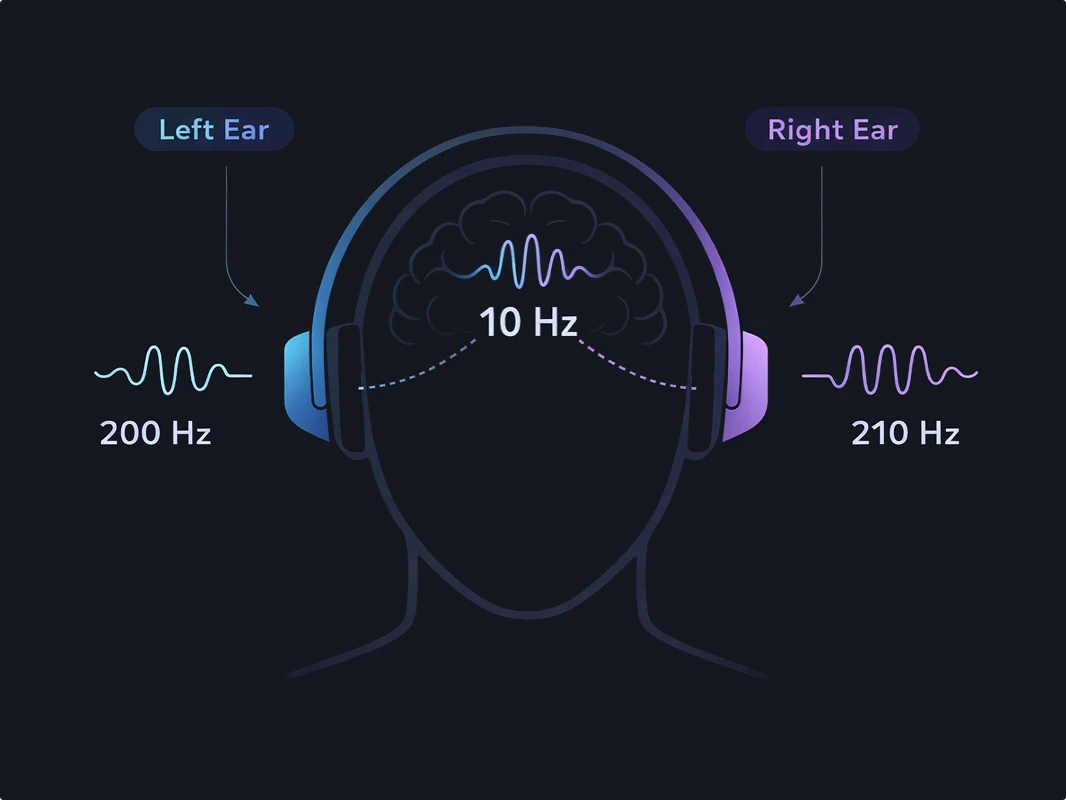
Binaural beats are created by playing two slightly different frequencies in each ear — for example, 200 Hz in one ear and 210 Hz in the other. Your brain perceives the difference as a 10 Hz rhythmic beat.
This effect is often called brainwave entrainment and is commonly associated with relaxation, focus, or sleep.
Frequently Asked Questions
Answers about binaural beats, safety, and how to use the generator.
Do I need headphones for binaural beats?
Yes. Headphones are required so each ear receives a slightly different frequency, creating the binaural effect.
How long should I listen to binaural beats?
If you’re new, start with 10–15 minutes. Many users prefer 20–30 minute sessions once they get used to it.
Longer sessions are also fine for relaxation or sleep, as long as the volume is comfortable.
Which frequency should I choose?
Choose a frequency based on your goal — sleep, relaxation, focus, or energy.
You can explore detailed explanations on our page about binaural beat frequencies.
Learn more about brainwave frequencies →Are binaural beats safe?
Generally yes, when used responsibly and at comfortable listening levels.
Avoid use if you have epilepsy or a history of seizures. If you have a medical condition, are pregnant, or use a pacemaker, consult a healthcare professional before use.
Do not listen while driving or operating machinery, as binaural beats may promote relaxation or drowsiness.
Why is the download limit set to 60 minutes?
You can stream sessions up to 8 hours in your browser, but downloads are limited to 60 minutes.
Generating high-quality audio files is resource-intensive, and this limit helps ensure stable performance across devices.
How does PureBinaural create binaural beats?
PureBinaural generates precise sine waves in real time using the Web Audio API, with each channel controlled independently.
Sessions are rendered at 44.1 kHz, normalized to safe levels, and include smooth fade-in and fade-out.
Is using PureBinaural private?
PureBinaural runs entirely in your browser, so no audio data leaves your device.
No accounts, no cookies, and no personal data collection.
We use only basic, anonymous usage statistics to improve the project.
Can I create my own binaural beat session?
Yes. PureBinaural lets you customize the carrier frequency, binaural beat frequency, session duration, volume, and optional ambient sounds. You can also save or share presets and download supported sessions for offline listening.